How to Organize a Listen-Later Queue With Library Collections
Readox collections are playlist-like queues for articles, PDFs, selections, summaries, and saved text, with duration, progress, reordering, resume, and continuous playback.
Readox collections are playlist-like queues for articles, PDFs, selections, summaries, and saved text.
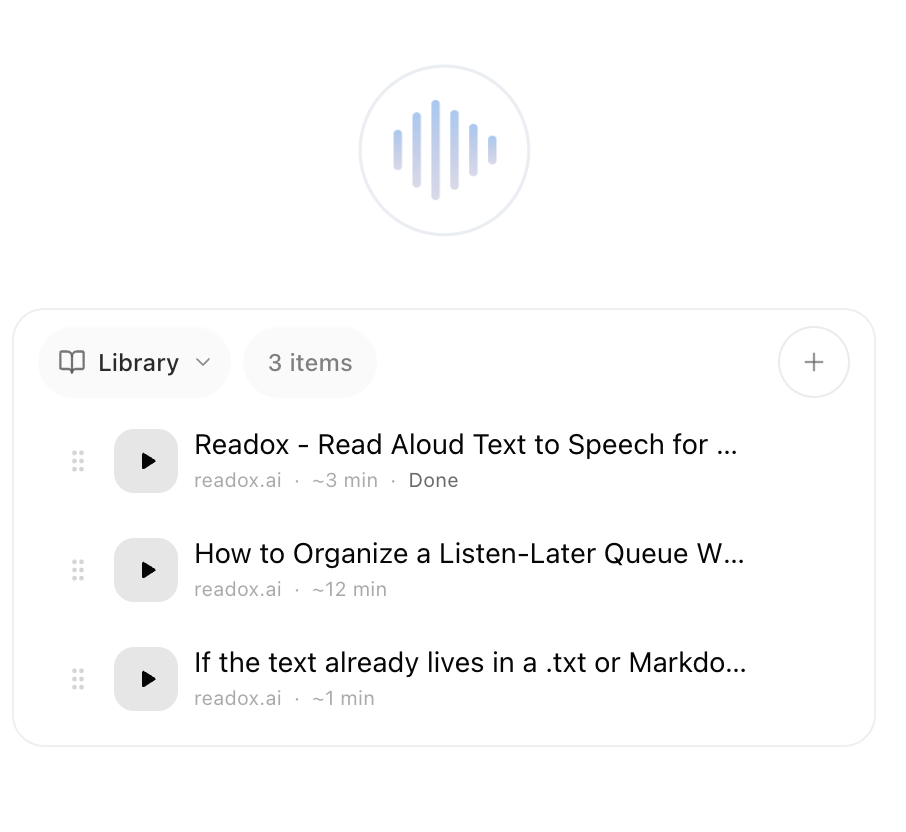
A normal read-later folder mostly holds whole pages. A Readox collection can mix a full page, a saved selection from a page or from a Google Doc, a summary you kept, extracted PDF text, and text you pasted or typed yourself. Each item can show a duration estimate and playback progress. You can reorder the run, resume near the saved sentence, and move into the next item automatically with continuous playback.
Collections are not just a place to put things. They are where different kinds of saved reading turn into one playable sequence.
Collections also solve the simpler problem. Instead of throwing every save into one backlog, you can keep different groups of material in separate queues and come back to them later with a purpose. The bigger difference is that the queue can hold mixed material and keep its playback state, not just split things into folders.
What this looks like in practice
One collection might hold a full article you want to hear later, a paragraph you clipped from another page or from a Google Doc, a summary that was enough on its own, text extracted from a PDF, and a short note you pasted in yourself.
When you come back, you are not looking at a pile of unrelated saves. You are looking at a run you can reorder, resume, and play through.
What can actually go into a collection
Collections are not only for full-page saves.
In Readox, the same collection can hold full pages, saved selections, summarized content, PDF text once it has been extracted into readable form, and pasted or typed text you decided to keep. That means a collection can reflect how people actually work across a browser session. You may save one whole article, keep only one useful section from another page or from a Google Doc, save the short summary instead of the long original, drop in a PDF you want to hear later, keep a cleaned-up answer from ChatGPT, Claude, or Gemini, and add a small note of your own. If the text starts in a file instead, plain text and Markdown support covers that path. If it starts as an image or scan, OCR for screenshots, photos, and scanned documents is the other side of the same intake system.
That mix changes the whole feel of the queue. A normal bookmark list treats everything as roughly the same kind of item. Readox lets one queue combine source material, shorter versions of that material, and text that never came from a page in the first place.
What a collection is in Readox
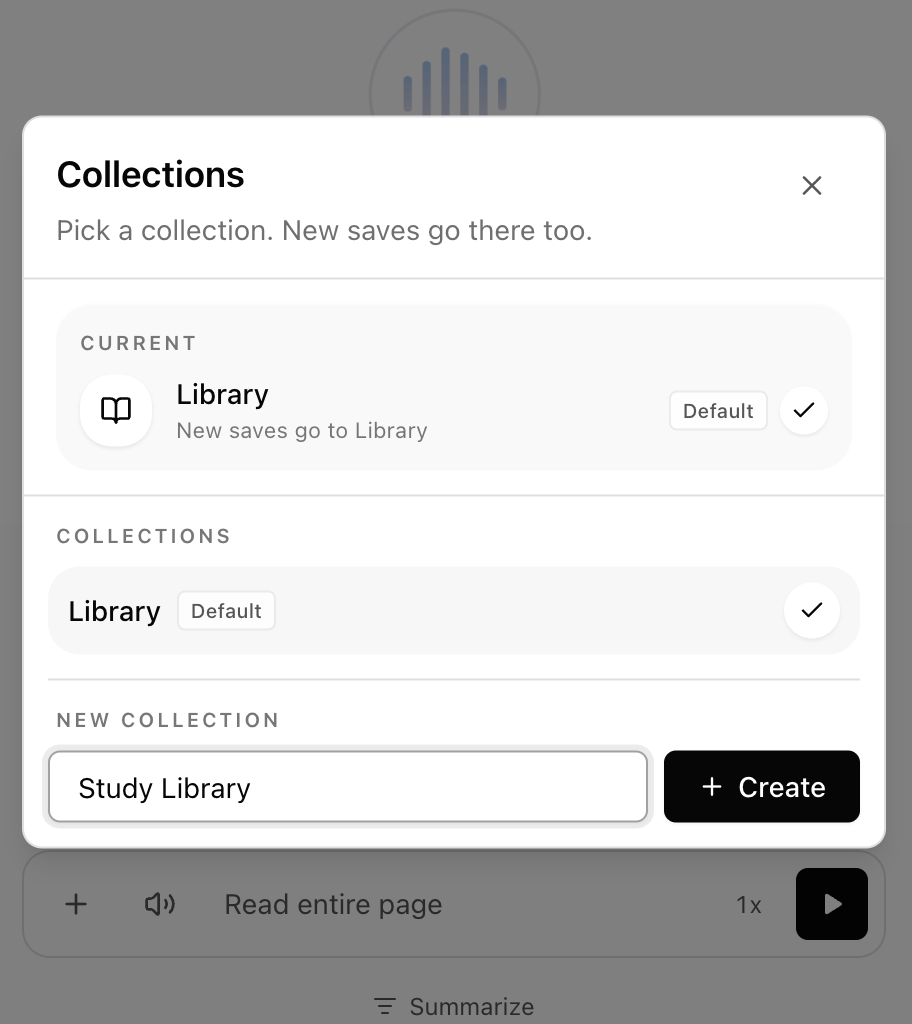
Every Readox account starts with a main Library.
It is the default place where saved pages live. If you never create anything else, the product still works as a simple save-now, listen-later library.
Collections add another layer on top. The default Library stays as the catch-all, people on Pro can create up to 10 collections, and when you switch to a collection, new saves go there. That last part is the important behavior. Collections are not just labels you apply later. They can act as the active destination for new saves while you browse.
If you switch into Work, new saves go into Work. If you switch into Review, new saves go there instead. That makes the collection picker part of the intake flow, not just cleanup afterward. It matters even more once you start saving while browsing from the right-click menu or from keyboard shortcuts.
Why collections matter for a listening product
Collections are not just for keeping things neat. They separate listening contexts that should not compete with each other: work research, personal reading, long-form pieces, short focused queues, and material you want to summarize before deciding whether to keep. Without that separation, a library becomes a backlog. With it, the library starts behaving more like a queue. A good collection can act like a digest: a small run of full pages, saved selections, summaries, PDFs, and personal text that belong together in one session.
The difference shows up when you come back later. A useful collection is not just “things about the same topic.” It is a queue with a shape. You can tell why those items belong together and what kind of listening session they are meant for.
A simple way to think about your collections
The easiest mistake is organizing by abstract categories that sound neat but do not match how you actually save things.
Better collection structures usually map to one of three things: context, project, or listening intent. A context-based setup might use collections like Work, Personal, or Review. A project-based setup might use names like Q2 planning or Hiring research. A listening-intent setup might use Listen soon, Summarize first, or Long reads. If you cannot tell where a page should go within a second or two, the system is too complicated.
Collections are better when you think like an editor
The most useful collections usually feel less like folders and more like playlists. You are not only filing pages by topic. You are deciding what belongs together in one listening session.
For example, a good digest-style collection might mix a full article, a saved paragraph from a different page or from a Google Doc, a summary you decided to keep, a PDF you want to hear later, and a short typed note or script of your own. That makes it easier to come back to the queue with a plan instead of one endless list.
What the queue remembers for you
Collections do not just hold items. They also keep the state that makes a listen-later queue usable.
Each saved item can show an estimated listen time in minutes, playback progress as a percentage once you have started, and a clear Done state when you finish. In the library UI, that means you can look at a collection and immediately tell what is untouched, what is in progress, and what you already finished. That is a big part of why collections feel more like queues than folders.
Readox also resumes library playback from the saved sentence instead of crudely jumping to some random text fraction. So if you stop halfway through an item and come back later, the collection is not just remembering that you started. It is remembering roughly where to pick back up.
Why that matters
A bookmark list can tell you that you saved something. A listening queue needs to tell you more: how long the item is, whether you already started it, whether you finished it, and where to resume.
Time remaining, percent complete, `Done`, and sentence-level resume matter because they turn saved reading into something you can actually run through.
A better way to picture it
The product already has the cues people expect from a playlist: duration on each item, visible progress, reorder handles, and continuous playback into the next save.
The difference is that the items are pages, PDFs, selections, summaries, and saved text instead of songs or podcast episodes.
When to keep using the main Library
The main Library is still useful even if you have collections.
Use the main Library when you are saving casually and do not want to decide yet, when the content is generally interesting but not part of a project, or when you want a default inbox before organizing anything else. Keeping the default Library matters because it stops collections from turning the product into a filing cabinet.
When a custom collection is better
Switch to a collection before saving when you already know the context.
This works better when you are researching one topic across many tabs, building a dedicated queue for your next review session, or separating deep work material from casual reading. In those cases, active-collection saving is better than bulk cleanup later because the sorting happens while the decision is still obvious.
It also helps because you are curating in the same moment you discover the material. That is closer to how a digest gets built in real life. You find something, decide it belongs in a specific run of listening, and save it there immediately.
How to build a digest with collections
The practical version is simple:
- Pick a collection before you start browsing.
- Save only the pages, selections, summaries, PDFs, or text notes that belong in that session.
- Keep the collection narrow enough that you would realistically want to hear it in one block.
That could mean a browser-session digest, a focused review digest, a project update digest, or a weekly reading packet. The important thing is that the collection has a purpose, not just a topic label.
Another important detail is ordering. Collections are not fixed dumps. In the extension you can manually reorder items with drag handles, which means you can decide what should come first, what should come later, and what belongs at the end of the run.
Where continuous playback changes the experience
This gets more useful once you treat a collection as something to run through, not just store.
Readox has a continuous playback setting that automatically plays the next item when one finishes. That means a collection can behave like a real listening sequence instead of a set of isolated saves.
With continuous playback on, a collection starts behaving less like storage and more like a hand-built audio digest. That is where the mixed-item part becomes useful. You are no longer just opening one saved page at a time. You are moving through a sequence you put together on purpose.
Free vs Pro
Free includes the main Library and premium English and Spanish voices. Pro adds up to 10 collections, more saved library items, and separate reading queues beyond the default Library. One library is enough for a simple save-now, listen-later habit. Multiple collections are useful once you want separate queues for different kinds of material.
There is also a practical cap of 50 items per collection right now. That is another reason the best collections stay narrow. They work better as deliberate runs than as giant warehouses.
A setup that works well in practice
If you want a simple starting point, do not create ten collections just because you can. Start with three: the default Library for everything unsorted or general, Work for project and research material, and Digest or Long reads for things you want to hear in a more intentional run. That is enough structure to keep the queue useful without turning every save into an organizational task.
Why collections help
Collections are not there to make your library look neat. They are there to make saving things feel worthwhile because you know they are landing in a queue that still makes sense later.
The big difference is simple: one collection can combine full pages, saved selections, summaries, PDFs, and personal text, then show duration and progress, resume near the saved sentence, let you reorder the run, and autoplay the next item when one finishes.
A page saved today should be easy to find, easy to group, and easy to hear at the right time tomorrow. Collections help with that by turning a backlog into smaller, playable queues you can actually use.
Read aloud web pages and PDFs with free premium English and Spanish voices that run on your device.
Related Reading
More guides that connect to this workflow.
How to Listen to Your Own Notes, Drafts, and Pasted Text
Readox can read pasted or typed text directly in the sidepanel, which is useful for your own notes, AI-generated notes, GitHub snippets, markdown drafts, copied passages, and other working text.
How to Turn Saved Text Into Listening Routines for Study, Language Learning, and More
Readox is not just for one-off pasted text. You can turn saved text into repeatable listening routines for affirmations, language drills, study review, and AI-generated practice material.
How to Listen to Markdown and Plain Text Files Without Hearing the Markup
Readox can read both plain text and Markdown files aloud. Plain text plays as-is, while Markdown is cleaned up so you hear the content instead of the syntax.